- Google Colab notebook
- Materials for this session
- Source notebook
- Local data file used in this post:
data/niamey.csv - Example of final output
- PDF version of materials (with code and outputs)
AI-Guided SIR Modeling Hackathon (2 Hours)
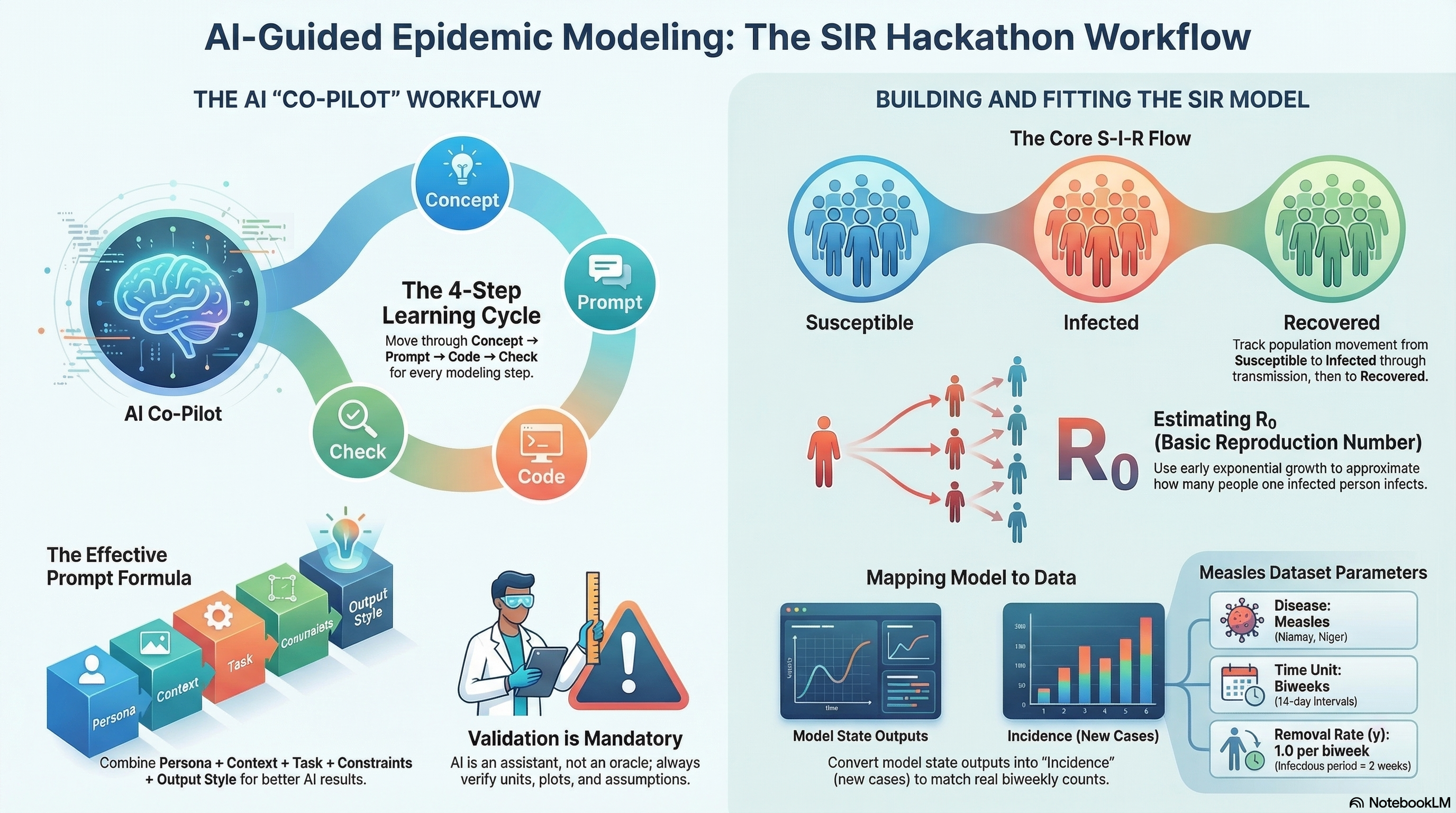
This notebook is the workshop skeleton for the AI-Guided SIR Modeling Hackathon.
- Dataset: Niamey, Niger measles outbreaks (biweekly case counts; communities A/B/C)
- Tooling: Google Colab + Python + ChatGPT
- Time unit: biweeks
- Key modeling shortcut: infectious period ≈ 2 weeks ⇒ γ ≈ 1 per biweek
Overview
This live session uses prompt-driven analysis to move from raw biweekly measles counts to a calibrated SIR model for Community A.
By the end of the session, participants should be able to:
- Explore incidence patterns in
data/niamey.csv - Estimate early outbreak growth and approximate R0
- Map SIR model output to observed incidence via cumulative infections
- Fit model parameters with least squares and Poisson likelihood
- Interpret uncertainty using a simple profile likelihood
Before the session
- Open the Colab notebook linked above.
- Confirm the dataset path is
data/niamey.csv(relative path). - Make sure Python can import
numpy,pandas,scipy, andmatplotlib. - Review the workflow sections below so you know where each prompt fits.
What is Google Colab?
Google Colab (short for “Colaboratory”) is a free, browser-based notebook environment where you can run Python code without installing a local Python setup.
For this session, Colab helps you:
- Run the workshop notebook directly from a shared link
- Execute code in small cells and inspect outputs step-by-step
- Combine narrative text, prompts, code, and figures in one place
- Save your own copy in Google Drive for continued practice
Tips for first-time users:
- Use Runtime > Run all to execute all cells in order
- If a cell fails, read the error, fix the prompt/code, then rerun that cell
- If the runtime disconnects, reconnect and rerun from the top
Troubleshooting
FileNotFoundError: verify you are using the relative pathdata/niamey.csv.- Missing package errors: install/import
numpy,pandas,scipy, andmatplotlib. - Flat or unstable fits: revise the selected early biweek window and re-run prompts.
- Predicted vs observed mismatch: confirm incidence alignment (
t[1:]vsdelta_H) in prompt logic. - Log-scale confusion: ensure you only log-transform strictly positive case counts.
Resources
How to use this notebook
Each section contains: 1) A ChatGPT prompt (Markdown) you can copy into ChatGPT
2) A starter code cell (often with TODOs) to run in Colab
Rule of thumb: Always request plots + sanity checks when you ask ChatGPT for help.
0. Setup
ChatGPT Prompt (copy/paste)
Persona:
You are an expert epidemiological modeler and Python educator.

Task:
- Write a Colab-ready setup cell: imports, basic plotting config, and a helper for reproducibility.
- If any package is missing show me how to run pip install

Constraints:
- Use numpy, scipy, pandas, matplotlib only

Verification:
- Print library versions and a simple "ready" message.
1. Explore the Niamey Measles Data:
Load the dataset and compute basic statistics
ChatGPT Prompt (copy/paste)
Persona:
You are an expert epidemiological modeler and Python educator.

Context:
- Dataset contains biweekly measles case counts from Niamey, Niger
- File path: data/niamey.csv

Task:
Write Python code to:
1. Load data/niamey.csv store it to `measles_df`
2. Display the first few rows
3. Print column names and basic information about the dataset
4. Show basic statistics about dataset

Constraints
- Use pandas only
- Keep code simple and readable
Exercise
TODO: Participants write a prompt to explain the results in plain language
Basic Plot
ChatGPT Prompt (copy/paste)
Persona:
You are an expert epidemiological modeler and Python educator.

Context:
- Dataset is already loaded into a DataFrame called `measles_df`
- Columns: biweek, community, measles

Task:
- Plot measles cases over time for each community
- Use one time-series plot
- Label axes and include a legend
- Briefly explain what biweekly case counts mean for epidemic modeling
2. Feature-Based Estimation: Early Growth (Quick R₀)
We estimate early exponential growth using a semi-log regression: - Choose an early window where cases grow roughly exponentially. - Fit log(cases) vs time.
ChatGPT Prompt (copy/paste)
## Persona

You are an **expert in infectious disease modeling**, with experience in early-outbreak analysis and interpretation of epidemic growth rates.

## Context

* **Disease:** Measles
* **Community:** A
* **Data:** Biweekly reported case counts
* **Epidemic phase:** Early outbreak (first ~8–10 biweeks), where case counts exhibit **exponential growth**
* **Dataset:** Already loaded as `measles_df`

### Dataset structure

`
<class 'pandas.core.frame.DataFrame'>
RangeIndex: 48 entries, 0 to 47
Columns:
- biweek     (int64)
- community  (object)
- measles    (float64, 47 non-null)
`

## Task

Estimate the **early exponential growth rate** of the outbreak by:

1. Selecting an appropriate **early biweek window** (≈ 8–10 biweeks)
2. Fitting a **log-linear model**: log(measles cases) vs. time
3. Producing a **semi-log plot** showing observed data and fitted exponential growth
4. Converting the estimated growth rate to an **approximate basic reproduction number (R₀)**, assuming:

   * Infectious removal rate: **γ = 1 per biweek**

## Constraints

* Use **NumPy** and **SciPy** only (Matplotlib for plotting is acceptable)
* Clearly **state and explain modeling assumptions**
* Print key **statistical results** (e.g., slope, confidence intervals if available, R₀)
* **Output code only** (do not execute)

## Verification / Expected Output

* A **semi-log plot** of measles cases with the fitted exponential curve
* Printed values for:

  * Estimated **growth rate (slope)**
  * Corresponding **R₀ estimate**
Goal Assess how sensitive the estimated basic reproduction number (R₀) is to the choice of early-outbreak window length.
Method (brief) For a sequence of increasing early-outbreak windows (measured in biweeks):
- Fit a log-linear model to early reported measles cases to estimate the exponential growth rate.
- Convert the growth rate to R₀ assuming a fixed infectious removal rate (γ = 1 per biweek).
- Compute a 95% confidence interval for R₀ from the regression uncertainty.
- Visualize R₀ and its uncertainty as a function of the window length.
Interpretation Stable R₀ estimates across window lengths suggest a robust early-growth signal, while strong variation indicates sensitivity to window choice or departures from exponential growth.
Continue with the the prompt
For a range of early-outbreak window lengths, plot the estimated R₀ (derived from exponential growth rates) together with its 95% confidence interval, as a function of the initial period length (in biweeks).3. Implement the SIR Model (Biweekly Units)
We use a closed SIR model for a single outbreak wave: - S(t): susceptible - I(t): infectious - R(t): recovered
Time unit = biweeks.
ChatGPT Prompt (copy/paste)
Persona:
You are an expert epidemiological modeler and Python educator.

Context:
- Closed SIR model (no birth or death)
- Time unit: biweeks
- Infectious period ≈ 2 weeks (gamma ≈ 1 per biweek)

Task:
Implement an SIR model using SciPy ODE solving:
- Define the SIR equations, the function name should be `sir_rhs`
- Solve over a biweekly time grid, put it in the function `simulate_sir`
- Plot S, I, R over time

Constraints:
- Use scipy.integrate.solve_ivp
- Keep code readable and commented

Verification:
- Plot S, I, R
- Verify S + I + R ≈ N
4. Map Model Output to Observations (Incidence via ΔH)
Observed data are biweekly case counts, not the state I(t).
We model incidence using an accumulator:
- Add
H(t)with dH/dt = β S I / N
- Predicted biweekly counts ≈ ΔH over each biweek interval
ChatGPT Prompt
Persona:
You are an expert epidemic modeler.

Context:
- Observed data are biweekly case counts (incidence)
- SIR model outputs states

Task:
Extend the SIR model by:
- Adding H(t) with dH/dt = beta*S*I/N
- Computing predicted biweekly cases as ΔH aligned to biweeks

Constraints:
- Keep code minimal and readable

Verification:
- Plot predicted ΔH
Continue with the prompt to plot the data
I have biweekly measles incidence data for Community A:

measles_df = pd.read_csv("data/niamey.csv")

dfA = (
    measles_df
    .loc[measles_df["community"] == "A", ["biweek", "measles"]]
    .dropna(subset=["measles"])
    .copy()
)

- dfA["biweek"] contains the biweekly time index

- dfA["measles"] contains observed biweekly incidence (number of cases)

I also have an SIR model that returns simulated incidence:

def simulate_sir_with_incidence(
    N=1000,
    I0=1,
    R0=0,
    beta=2.5,
    gamma=1.0,
    t_max=20
):
    ...
    return t, S, I, R, H, delta_H

Where:

t → model time points (in biweeks)

delta_H → simulated biweekly incidence (new infections per biweek)

H → cumulative infections

What I want to do

- Plot observed measles incidence (dfA["measles"])

- Overlay simulated biweekly incidence (delta_H) on the same figure

- Use t[1:] when plotting delta_H as len(t) is different from len(delta_h) by 1 unit
5. Fit Parameters by Least Squares
We fit parameters by minimizing squared error between observed counts and predicted ΔH.
ChatGPT Prompt (copy/paste)
## 👤 Persona

You are an **expert in numerical optimization for epidemic models**, with experience fitting compartmental models to incidence data using nonlinear least squares.

---

## 📂 Data

We have **biweekly measles incidence data** for **Community A**:

measles_df = pd.read_csv("data/niamey.csv")

dfA = (
    measles_df
    .loc[measles_df["community"] == "A", ["biweek", "measles"]]
    .dropna(subset=["measles"])
    .copy()
)

* `dfA["biweek"]` → biweekly time index
* `dfA["measles"]` → observed biweekly incidence (case counts)

---

##  Model

We use an SIR model that returns simulated incidence:

def simulate_sir_with_incidence(
    N=1000,
    I0=1,
    R0=0,
    beta=2.5,
    gamma=1.0,
    t_max=20
):
    ...
    return t, S, I, R, H, delta_H

Where:

* `t` → model time points (in biweeks)
* `delta_H` → simulated **biweekly incidence** (new infections per biweek)
* Use `t[1:]` to align with `delta_H` (since incidence is computed between time steps)

---

## 🎯 Objective

Fit model parameters to the observed incidence data using **nonlinear least squares**.

### Parameters to estimate:

* `N` (population size)
* `beta` (transmission rate)
* Optional: `I0` (initial infected)

### Fixed parameter:

* `gamma = 1.0`

---

## 📈 Initialization Strategy

Use an early-growth estimate:

* Estimated basic reproduction number:

  [
  R_0 = 1.443
  ]

* Since ( R_0 = \beta / \gamma ), initialize:

  [
  \beta_0 = 1.443
  ]

Choose reasonable initial guesses and bounds:

* `N` within plausible community size range
* `beta > 0`
* `I0 ≥ 1`

---

## ⚙️ Optimization Requirements

* Use `scipy.optimize.least_squares`
* Fit by minimizing:

[
\text{SSE} = \sum ( \text{Observed} - \text{Predicted} )^2
]

* Ensure runtime is suitable for a workshop (avoid heavy MCMC or expensive methods)

---

## 📊 Verification & Output

After fitting:

1. Overlay observed and fitted incidence curves
2. Print:

   * Best-fit parameter values
   * Sum of squared errors (SSE)

---

## 📌 Expected Deliverables

* Residual function definition
* Call to `least_squares`
* Overlay plot (observed vs fitted)
* Printed parameter estimates and SSE
* Clean, reproducible workshop-ready code
6. Poisson Likelihood Inference (Counts)
For count data: - ( y_t (_t) ) - ( _t = H_t )
where ρ is a reporting/ascertainment fraction.
ChatGPT Prompt (copy/paste)
# 👤 Persona

You are an **expert in numerical optimization for epidemic models**, with experience fitting compartmental models to incidence data using likelihood-based methods.

---

# 📂 Data

We have **biweekly measles incidence data** for **Community A**:

measles_df = pd.read_csv("data/niamey.csv")

dfA = (
    measles_df
    .loc[measles_df["community"] == "A", ["biweek", "measles"]]
    .dropna(subset=["measles"])
    .copy()
)

t_obs = dfA["biweek"].values
y_obs = dfA["measles"].values

* `t_obs` → biweekly time index
* `y_obs` → observed biweekly incidence (case counts)

---

#  Model

We use an SIR model that returns simulated incidence:

def simulate_sir_with_incidence(
    N=1000,
    I0=1,
    R0=0,
    beta=2.5,
    gamma=1.0,
    t_max=20
):
    ...
    return t, S, I, R, H, delta_H

Where:

* `t` → model time points (in biweeks)
* `delta_H` → simulated **biweekly incidence**
* Use `t[1:]` to align with `delta_H`

---

# 🎯 Objective

Fit model parameters to the observed incidence data using **maximum likelihood under a Poisson observation model**.

Assume:

[
Y_t \sim \text{Poisson}(\lambda_t)
]

where:

* ( Y_t ) = observed incidence
* ( \lambda_t ) = model-predicted incidence (`delta_H`)

---

# 📌 Parameters to Estimate

* `N` (population size)
* `beta` (transmission rate)
* Optional: `I0` (initial infected)

### Fixed parameter:

* `gamma = 1.0`

---

# 📈 Initialization Strategy

Use early-growth estimate:

[
R_0 = 1.443
]

Since:

[
R_0 = \beta / \gamma
]

Initialize:

[
\beta_0 = 1.443
]

Use reasonable bounds:

* `N` within plausible community size range
* `beta > 0`
* `I0 ≥ 1`

---

# ⚙️ Optimization Requirements

Use `scipy.optimize.minimize` (or `least_squares` minimizing −log-likelihood).

Minimize the **negative Poisson log-likelihood**:

[
\mathcal{L}(\theta)
===================

\sum_t \left(
\lambda_t - y_t \log(\lambda_t)
\right)
]

(omit constant (\log(y_t!)) term)

Add small epsilon to avoid `log(0)`.

Ensure runtime is suitable for a workshop (no MCMC).

---

# 📊 Verification & Output

After fitting:

1. Overlay observed and fitted incidence curves
2. Print:

   * Best-fit parameter values
   * Final negative log-likelihood
3. (Optional) Compare visually against least-squares fit

---

# 📌 Expected Deliverables

* Negative log-likelihood function definition
* Call to optimizer
* Overlay plot (observed vs fitted incidence)
* Printed parameter estimates
* Clean, reproducible workshop-ready code
* Proper numerical safeguards (`epsilon` for stability)
7. Quick Uncertainty: Profile Likelihood for β (Optional)
ChatGPT Prompt (copy/paste, continue with the likelihood chat)
Persona:
You are an expert in likelihood-based inference.

Context:
- We already have a Poisson likelihood fit
- We want uncertainty for beta

Task:
Create a profile likelihood for beta:
1) Fix beta over a grid
2) Optimize I0 and rho for each beta
3) Plot profile NLL(beta)

Constraints:
- Keep runtime reasonable for a workshop

Verification:
- Profile plot
- Explain how to interpret the uncertainty
8. Generate a Markdown Summary (Hackathon Report Cell)
ChatGPT Prompt (copy/paste)